

IT Alerts & Scheduled Downtime
IT Alerts
- The Mac Lab (Ms 222) is reserved for a class on Mondays, Wednesdays, and Fridays from
2:20–3:30 p.m. during the Fall 2025 semester and is not available for public use at
those times.The Mac Lab (Ms 222) is reserved for a class on Mondays, Wednesdays, and Fridays from 2:20–3:30 p.m. during the Fall 2025 semester and is not available for public use at those times.
- New Hostname Available for CSX Nodes
We are pleased to announce that a new hostname, csx.cs.okstate.edu, is now available for connecting to the CSX environment.
-
This hostname will automatically route users to a random available node in the range csx0 to csx4.
-
This simplifies access and helps balance user load across CSX systems.
You may still connect to a specific node directly (e.g., csx1.cs.okstate.edu) if needed.
Important: SSH Host Key Changes
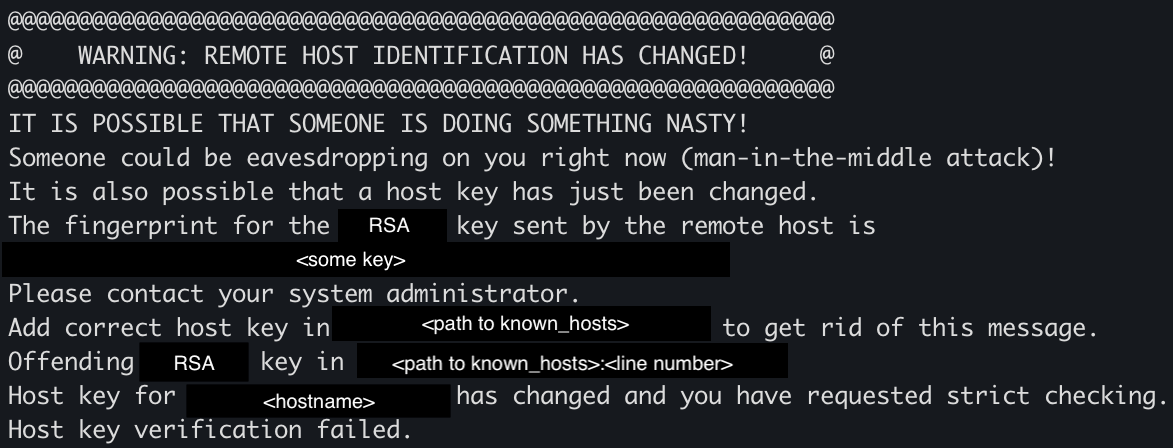
If you last connected to any CSX host previous to Summer 2025, you will likely encounter the following warning when using SSH:
This is expected and nothing to worry about.
---------------------------------------------

---------------------------------------------
How to Resolve the SSH Warning
To resolve the SSH host key warning:
-
Remove the old host key from your known hosts file by running the following command:
ssh-keygen -R csx0.cs.okstate.edu -
Repeat above command for any other CSX node you previously connected to (csx1, csx2, etc.).
-
Reconnect via SSH — the system will prompt you to accept the new host key. Once accepted, you won’t need to do this again unless the host key changes again (which we do not anticipate).
-
PuTTY users may see a warning dialog when connecting. You can safely accept the new key and continue as normal.
-
- Recent Change to CSX Login Credentials
Starting June 1, 2025, all CSX servers began using Okey credentials for authentication. This means you no longer need (or are able) to set a separate CSX-specific password.
Important Notes & Side Effects:
-
The "pwreset" page has been retired and now automatically redirects to
-
The
passwdcommand on CSX will no longer function for users authenticated via Okey credentials. -
All individual accounts (existing and new) now use Okey credentials exclusively.
⤷ As a result, all previously set CSX-specific passwords has been discarded.
-
- Apple Computers will be Transitioned to a new Computer Management System - Scheduled
TBAApple computers (iMacs and MacBooks) will be transitioned to a new computer management system, scheduled TBA. Users may experience brief downtime during this period. Additional details will be communicated via email to affected Apple device users.
Scheduled Downtime
-
The MAC Lab MS 222 is closed for maintenance on October 2, 2025 from 11:20 AM to 12:00
PM
The MAC Lab MS 222 is closed for maintenance on October 2, 2025 from 11:20 AM to 12:00 PM
-
The MAC Lab MS 222 is closed for maintenance on September 18, 2025 from 11:00 AM to
12:00 PM
The MAC Lab MS 222 is closed for maintenance on September 18, 2025 from 11:00 AM to 12:00 PM
-
The MAC Lab MS 222 is closed for maintenance on August 22, 2025 from 12:00 PM to 1:00
PM
The MAC Lab MS 222 is closed for maintenance on August 22, 2025 from 12:00 PM to 1:00 PM
-
The MAC Lab MS 222 is closed for maintenance on July 30, 2025 from 11:00 AM to 11:30
AM
The MAC Lab MS 222 is closed for maintenance on July 30, 2025 from 11:00 AM to 11:30 AM
- The MAC Lab MS 222 is closed for maintenance on April 23, 2025 from 3:15 PM to 4:00
PMThe MAC Lab MS 222 is closed for maintenance on April 23, 2025 from 3:15 PM to 4:00 PM
- The MAC Lab MS 222 is closed for maintenance on April 18, 2025 from 10:45 AM to 11:30
AM
The MAC Lab MS 222 is closed for maintenance on April 18, 2025 from 10:45 AM to 11:30 AM.