
Department of Computer Science
Sharp BP-70C31
How to Install Sharp Drivers (Windows)
-
Download the Driver:
- Visit Sharp's official driver page.
- Download the PCL6 / PS / PPD Drivers for the selected printer.
-
Installation Options:
- The downloaded file is a self-install wizard that can:
- Automatically detect the MFP (Multi-Function Printer) on the network.
- Or allow manual setup by entering the IP address or Host Name.
- The downloaded file is a self-install wizard that can:
-
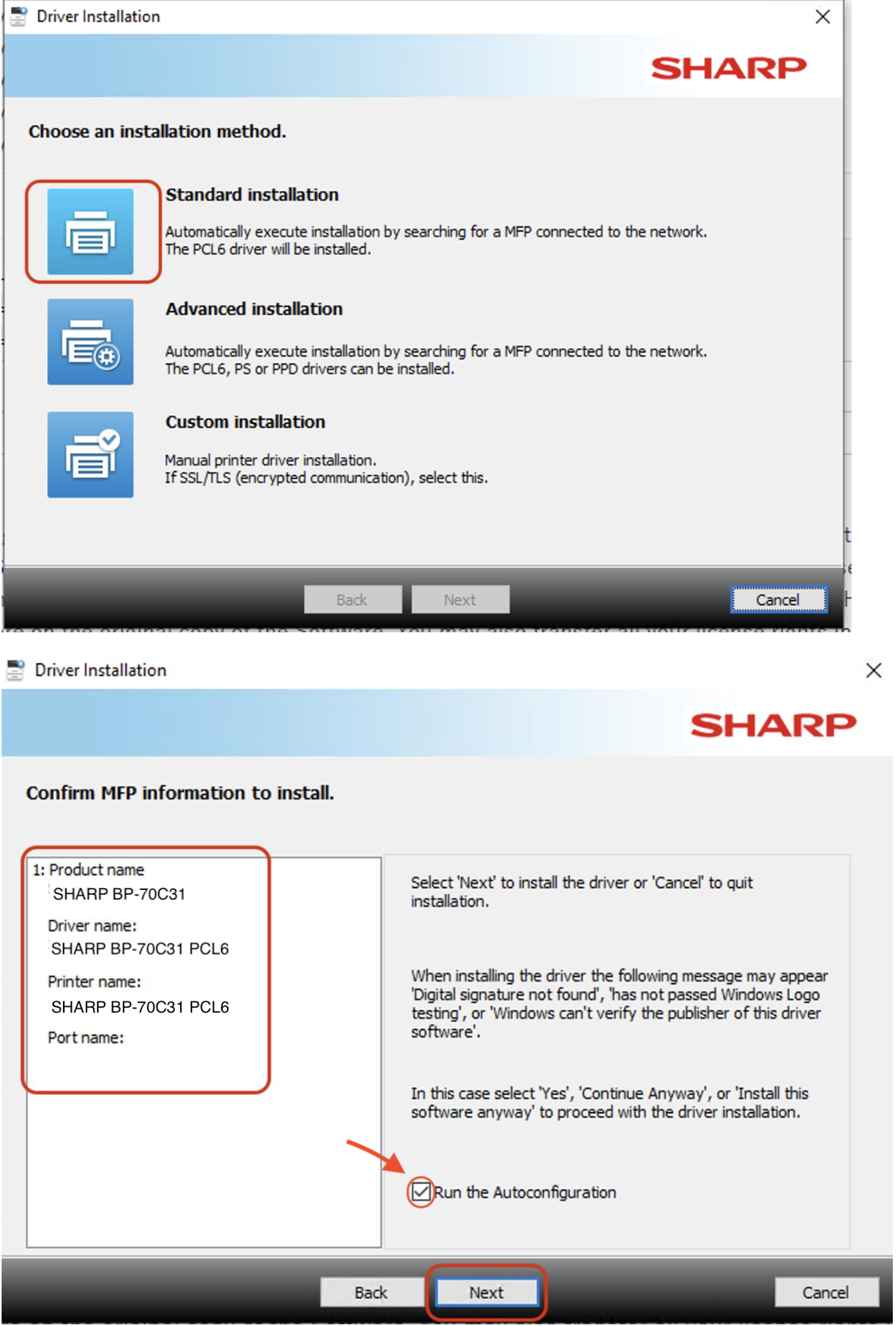
Installation Methods:
- Select Standard Installation: Auto-detects MFP and installs the PCL6 driver.
-
Driver Confirmation:
- Driver name:
SHARP BP-70C31 PCL6 - Printer name:
SHARP BP-70C31 PCL6
- Driver name:
-
Final Step:
- Select Run the Autoconfiguration.